
***If you are a NEW AGENT or LFRO AGENT go directly to books.skyslope.com/login - follow the on screen prompts to either login or reset password. Then skip to step #3***
- Log into Skyslope
- Go to skyslope.com and enter your login credentials to access your account
- Click on the 'Apps' icon at the top right
- Access Skyslope Books
- From the Apps menu, at the top right hand corner, select 'Books'
Set up SMS Authentication
- From the Apps menu, at the top right hand corner, select 'Books'
- Navigate to Your Profile
- In the top right corner, click on your profile icon
- From the drop-down menu, select 'Login Profile' Then select 'Company Profile' to manage your financial information
- Add Your Bank Account for Commissions
- Click on the option "Add Bank Account"
- Enter your account number manually (do not copy and paste)
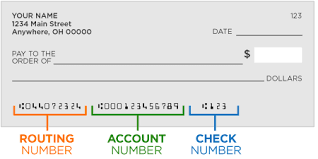
- Add a Credit Card for Agent Billing
- Follow the prompts to add your credit card information.
- Complete the Process
Once all information is entered, you can exit the application.